Define Services
The Define Services screen is where all services provided by the shipping company are registered.
For example, Shipping itself is a core service offered to customers. Additional services may include Collecting money from the end customer upon parcel delivery. Specialized services may also exist, such as Shipping fragile items, which ensures more careful handling of sensitive parcels.
All these services must be pre-registered in the Define Services list.
Access
From the Finance menu, select Define Services.
Internal Actions
- Add a new service: Click the
Add Servicesbutton. - Edit a service: From the
Actionscolumn, click theediticon. - Delete a service: From the
Actionscolumn, click thedeleteicon.
Required Data for Adding a New Service
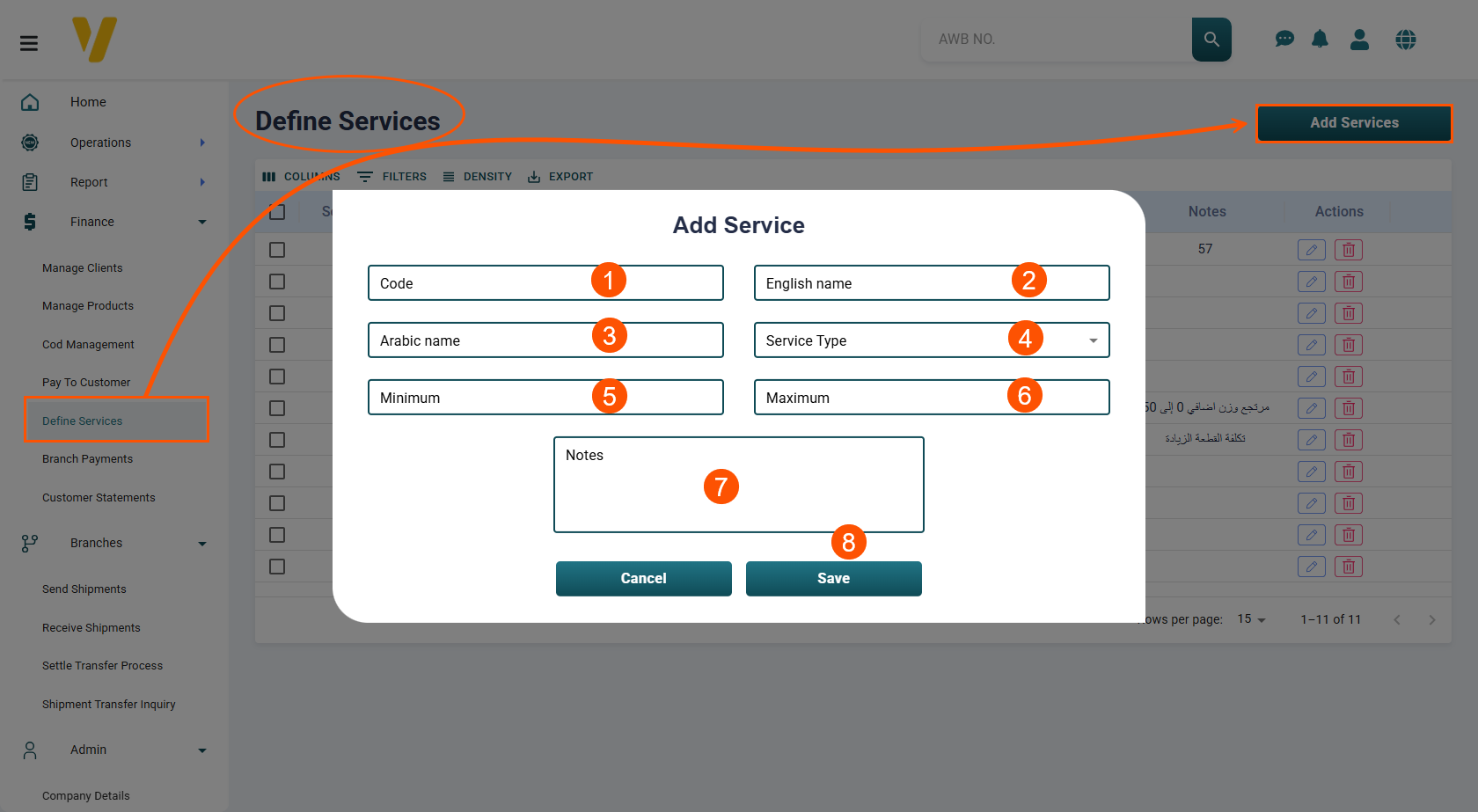
- Service Code – A unique identifier for the service.
- English Name – The service name in English.
- Arabic Name – The service name in Arabic.
- Service Type – Select the type of service from the dropdown list.
- Minimum Value – The minimum value representing the service.
- Maximum Value – The maximum value representing the service.
- Notes – Any additional details or remarks about the service.
- After filling in all fields, click Save to add the service to the list.