Current Calls
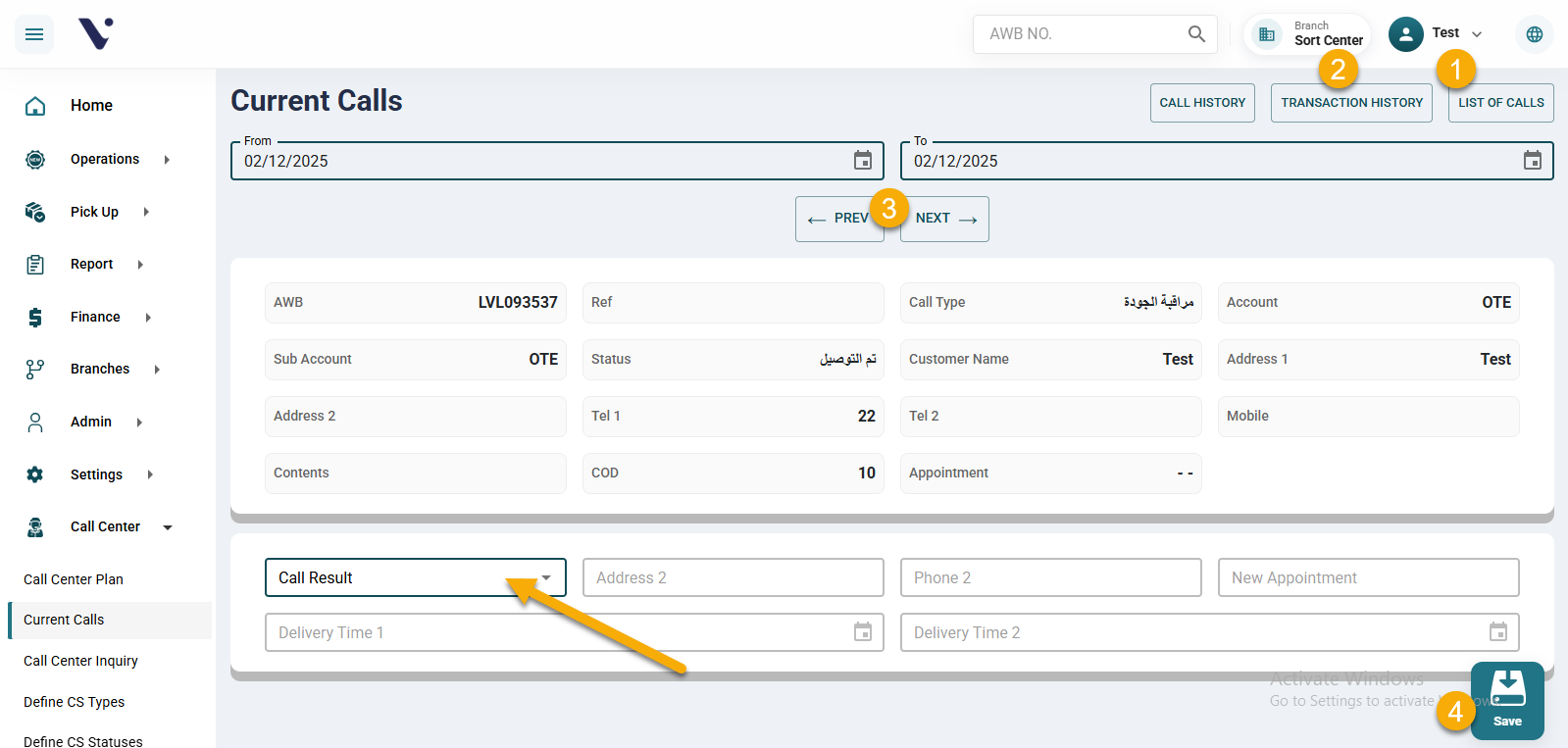
The Current Calls screen displays all shipments that were assigned to the user through the Call Center Planning screen. These shipments appear here so that the customer service agent can begin working on them.
In this screen, the agent will find:
1. Current Calls List
This section shows all the calls the customer service agent needs to make. Each item represents a shipment assigned to the agent for follow-up.
2. Transaction History
This section displays the full history of the current shipment the agent is handling. It helps the agent provide the customer with accurate information about the shipment’s progress and the stages it has gone through.
3. Next / Previous Buttons
Two buttons — Next and Previous — allow the agent to move between the current calls displayed on the screen and work on them one by one.
4. Call Outcome & Additional Details
After contacting the customer, the agent can record the call outcome by selecting from the available list (such as: Contacted, No Answer, Unavailable, etc.).
The agent can then add:
- Updated address
- Updated phone number
- A new delivery appointment
if the customer requests to modify these details.